
Original research · September 2026
What the findings actually mean
We graded the public security posture of 405 credit union domains. This page takes each finding and answers the questions a CEO or a board member should ask: what did you see, what does it let someone do to us, what does that cost, and what is the fix that actually works. The short version: the gaps are configuration, not tooling. The credit unions in the bottom fifth own the same products as the ones at the top.
Executive summary
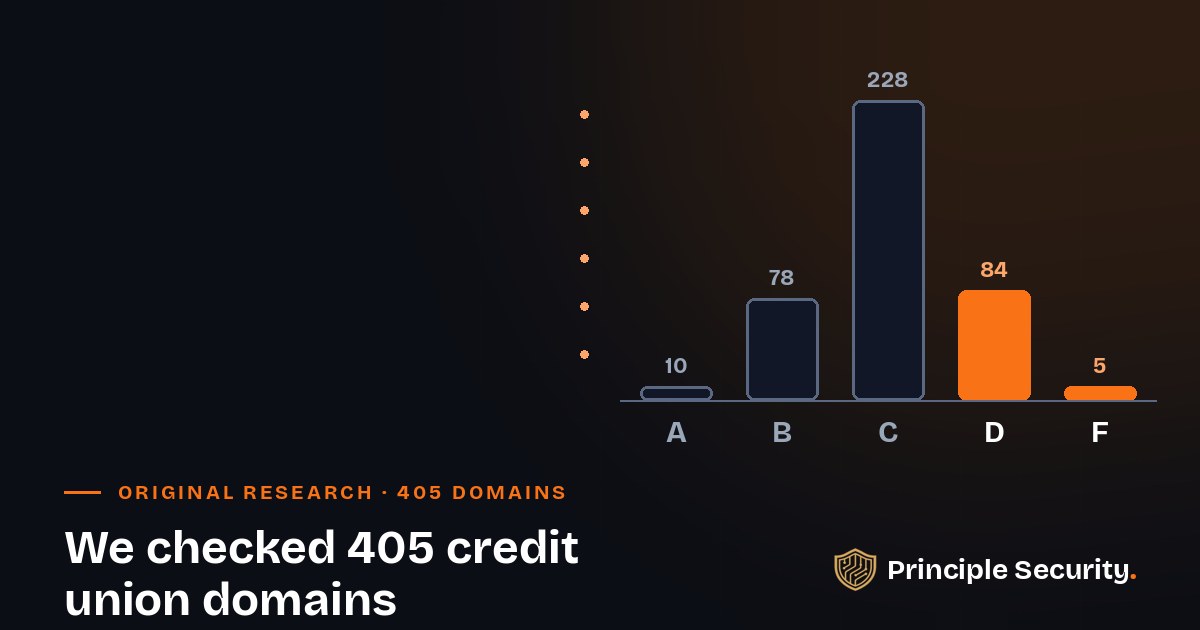
One in five credit union domains is graded D or F, and the reasons are the same everywhere
The primary domains behind 850 credit union contacts. Public record only, nothing touched.
89 domains. Between them they hold 173 of the 850 people, one in five.
101 domains where a forged email from the credit union's own name is detectable but not blocked.
Everyone passes the checks that vendors set up for them: SPF is on 100% of domains, DKIM wherever we could test, transfer locks on 97%. The failures cluster in the settings that need a decision from the institution itself: the DMARC policy, the web server's headers, the first hop from HTTP to HTTPS, the age of the TLS configuration.
The average score was 72 out of 100. Only three domains passed every graded check. The median domain fails three. Roughly a quarter cannot stop a forged email from their own name, and about a fifth cannot promise a member that her first request to their website is encrypted.
None of this needs a new product. Most of it is a change ticket, an afternoon, and someone who owns the outcome. That is the whole point of publishing it.
Grade distribution, 405 domains
Grades use the same weights and formula as the public Domain Security Check. Sweep date: September 3, 2026.
How we did this
Public record only. Nothing intrusive.
Every check reads data the institution already publishes to the world: DNS records over public resolvers (SPF, DMARC, DKIM, MTA-STS, CAA, DNSSEC), one TLS handshake with the public website, two page requests to observe the redirect and the response headers, and one registry (RDAP) query for expiry and lock status.
No logins. No scanning. No member data. No credential testing. Nothing that touches online banking or any system behind it. If a site blocked us, we recorded "untestable" rather than guessing. The 405 domains are the primary domains of credit unions we already correspond with; results are reported in aggregate and no institution is named.
The checks and the grading are the same ones we run inside client engagements, and the same ones behind the free public checker.
Check your own domain
Twenty seconds, no signup, a link you can forward
Open the Domain Security Check and enter your domain. You get the same grade, the same rows, and the same pass/fail per check that this page is built on.
To send the result to your IT lead or your board, add ?d= and the domain to the address, like this:
https://www.principlesec.com/domain-check?d=yourcreditunion.org
The check runs on page load and the page shows the grade for that domain. Under each finding below we name the row on the results page that corresponds to it.
Finding 1 · Email spoofing
DMARC missing or set to none
Results row: DMARC policy
What we found
Every one of the 405 domains publishes an SPF record. DKIM was present wherever we could test for it. Basic email authentication is table stakes in this sector, and the sector has paid it. Then 101 domains stop one step short: the DMARC record is either absent (2) or published with p=none (99). None means "tell me about forgeries, but deliver them anyway."
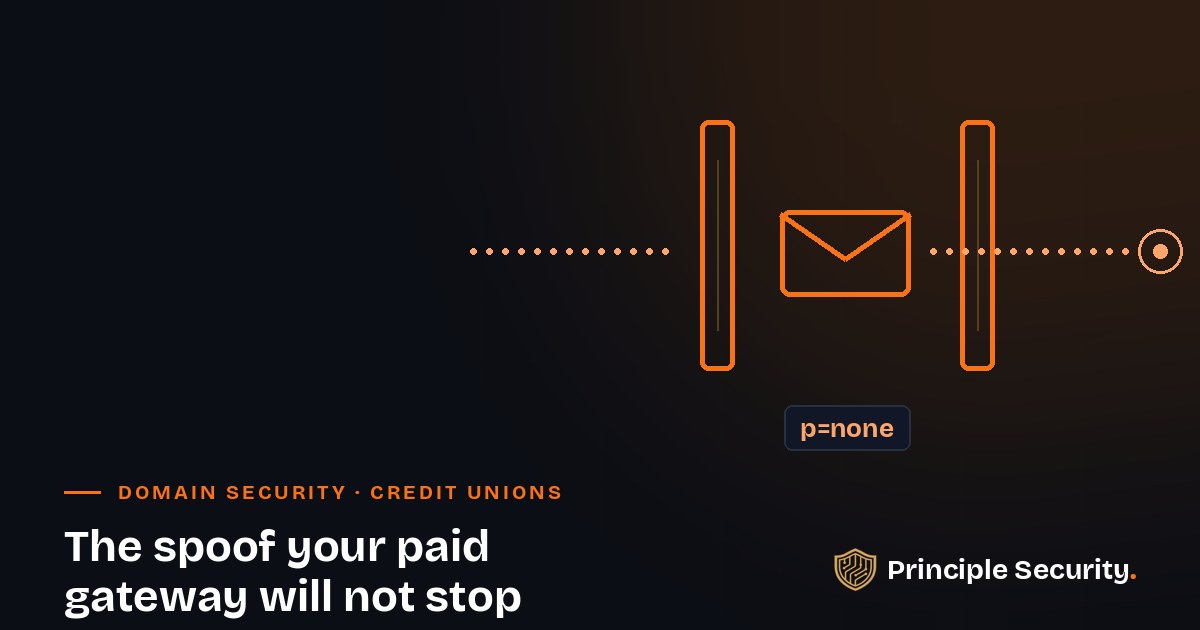
The part that should bother a CFO: 215 of the 405 domains route mail through a named security gateway (Mimecast, Proofpoint, AppRiver, Barracuda, Cisco), and 52 of those still sit at none. The invoice for the gateway is paid. The one setting that makes the world's mail systems reject a forgery of your name is not.
What it lets an attacker do
An attacker sends a message that says it is from yourcreditunion.org, using your real display names, to your members, your vendors, or your own accounting team. Gmail, Microsoft, and Yahoo all check your DMARC policy before deciding what to do with it. At none, they deliver it. Some add a faint warning. Most members never see it.
Who gets hurt: the member who moves money because "the credit union" told her to, the clerk who pays a vendor's "updated" bank details, and the institution that reimburses both. The FBI has put business email compromise losses above two billion dollars a year for several years running, and a single successful wire is routinely a six-figure event. Add the call-center surge, the card reissue, and the member who moves her accounts because the bank down the street "never sent her a scam email."
The reflexive fix
Buying another inbound filter, or telling the board "we have Proofpoint" and moving on. A gateway inspects mail arriving at your door. DMARC is the policy other people's mail systems enforce on mail that claims to be you. The gateway cannot fix a policy you have not published.
The fix that works
- Read the aggregate reports for two to four weeks and list every service that legitimately sends as your domain (core, statements, marketing platform, HR, ticketing).
- Get each one aligned: SPF includes and DKIM signing with your domain, not the vendor's.
- Move to
p=quarantine; pct=25, watch the reports, raise the percentage, thenp=reject. Addsp=rejectso untouched subdomains cannot be forged either. - Put the report mailbox on someone's calendar. Most "none" records we see were set up to collect reports nobody has read since.
Finding 2 · Web transport
HSTS missing, security headers absent
Results row: HSTS and Security headers
What we found
HSTS (HTTP Strict Transport Security) is one response header. It tells a browser "for the next year, never talk to this site over plain HTTP." Of the 374 sites we could test, 82 do not send it. Of the 203 sites where the page itself could be graded, 96 fail on the standard set of security headers (Content-Security-Policy, X-Frame-Options, X-Content-Type-Options, Referrer-Policy).
These are the findings that pulled most of the sector into a C. They are also the cheapest things on this page to fix.
What it lets an attacker do
Without HSTS, the first request a member makes to your site can still go out in the clear: she types the name, the browser tries HTTP first, and anything sitting on the path (the coffee-shop Wi-Fi, a compromised home router, a hostile hotspot) can answer in your place before the redirect ever happens. That is the whole mechanism behind SSL-stripping tools, and they are a decade old and free.
Missing headers turn a small web bug into a large one. No Content-Security-Policy means a single injected script on a marketing page can read what the member types. No X-Frame-Options means your login page can be framed inside a look-alike site for click-jacking. None of these is a breach on its own. Each one lowers the price of the next attack.
The reflexive fix
Asking the web vendor to "make the site secure" and accepting a screenshot of the padlock as the answer. The padlock proves the certificate is valid. It says nothing about the first request or the headers.
The fix that works
- Send
Strict-Transport-Security: max-age=31536000; includeSubDomainson every HTTPS response. Once you are confident, addpreloadand submit the domain to the browser preload list so even the first visit is protected. - Add the four baseline headers at the edge (CDN, WAF, or web server), not in application code, so a site redesign cannot silently drop them.
- Start Content-Security-Policy in report-only mode for a week, then enforce. Expect one afternoon of work, not a project.
Finding 3 · Web transport
Plain HTTP does not redirect to HTTPS
Results row: HTTP to HTTPS redirect
What we found
Twenty-five sites still serve something on port 80 without immediately sending the visitor to HTTPS. Twenty-two of those share one pattern: the bare domain redirects to www, but over plain HTTP, and only then to HTTPS. Two hops, the first one unencrypted.
It looks harmless in a browser because the final page has the padlock. It is not harmless. It is a guaranteed unencrypted request on every first visit.
What it lets an attacker do
The plain-HTTP hop is exactly the window an on-path attacker needs. They intercept the first request, answer with their own redirect, and send the member to a domain they control that looks like yours. The member typed the right name and still landed on the wrong site. No malware, no phishing email, no trace in your logs.
The cost shows up as account takeover claims, and account takeover is where the reimbursement, the regulatory reporting, and the member churn all live.
The reflexive fix
"We have a redirect." You have one that runs a hop late. The fix is not another redirect. It is making the first hop encrypted.
The fix that works
- Redirect the bare domain straight to
https://www.in one step, with a 301, on the same server that holds the certificate for both names. - Make sure the certificate covers the bare domain and www. Most of the two-hop cases we see exist because it only covers one.
- Then add HSTS with
includeSubDomains, so the browser stops asking.
Finding 4 · Web transport
Legacy TLS 1.0 and 1.1 still accepted
Results row: Legacy TLS
What we found
Twenty-two credit union sites still negotiate TLS 1.0 or 1.1 if a client asks. Every major browser dropped both in 2020. PCI DSS retired 1.0 in 2018. Your examiner's checklist has a line for this.
What it lets an attacker do
On its own, an old protocol is not a breach. What it does is give an attacker a downgrade target: force the connection to the weakest thing the server will speak, then apply the known attacks against it (BEAST, POODLE-style padding attacks, weak ciphers). It is also the single easiest "critical" for a penetration tester or an examiner to write up, because it is visible from the outside with one command.
The practical cost is credibility. A member-facing site that speaks 2006-era crypto reads as a site nobody is maintaining, and that is the read an attacker makes too.
The reflexive fix
Leaving it on "in case some member has an old device." No supported browser, phone, or operating system needs it. The devices that do are the ones that should not be doing online banking.
The fix that works
- Set the minimum protocol to TLS 1.2 at the load balancer, CDN, or web server. It is one line.
- Prefer TLS 1.3. Drop CBC and RC4 cipher suites while you are there.
- Re-run the check and keep the result as evidence for the next exam.
Finding 5 · Web transport
Broken or mismatched TLS certificates
Results row: TLS certificate
What we found
Nine domains present a certificate a browser will refuse: expired, self-signed, or issued for some other hostname. In practice this is usually the bare domain serving a certificate that only covers www, or a forgotten host that stopped auto-renewing.
What it lets an attacker do
Members are trained by warning screens. Once they learn that "the credit union's site always shows that warning, just click through," they will click through the attacker's warning too. A broken certificate does not just fail one visit. It teaches your members to ignore the one signal that would have saved them.
There is a second cost: an expired certificate on a host that other systems depend on (an API, a single sign-on endpoint, a vendor integration) becomes an outage, and outages during business hours cost real money in staff time and member calls.
The reflexive fix
Renewing the certificate by hand and putting a reminder in someone's calendar. That is how it expired last time.
The fix that works
- Automate issuance and renewal (ACME or your CDN's managed certificates) for every public hostname, including the bare domain.
- Subscribe to certificate-transparency alerts for your domain. You get told about every certificate issued for your name, yours and anyone else's, and the subscription is free.
- Inventory every public hostname once. The certificate that expires is always the one nobody listed.
Finding 6 · Domain hijack
Registrations expired or expiring
Results row: Domain expiry
What we found
Eight domains are expired or inside the window where the registrar will let them lapse. For a credit union, the domain is not a marketing asset. It is the name on every email, every statement link, every online-banking URL, and every password reset for every SaaS account the institution owns.
What it lets an attacker do
A lapsed domain goes through a grace period, then a redemption period, then auction. Drop-catching services register expiring names within seconds of release. Whoever catches yours gets your mail, your members' bookmarks, and every account whose recovery address ends in your domain. This is the quiet version of the domain hijack we worked this summer, and it needs no attacker skill at all, just patience.
Recovery, if it is possible, runs through UDRP or litigation and takes months. The interim is spent explaining to members why the credit union's website belongs to someone else.
The reflexive fix
Setting the domain to auto-renew and calling it done. Auto-renew fails silently when the card on file expires, the admin who set it up leaves, or the registrar's notices go to a mailbox nobody reads.
The fix that works
- Renew for the maximum term your registrar allows (usually ten years). Cost is trivial; the risk it removes is not.
- Put the registrar account in the vendor inventory with a named owner, a shared mailbox for notices, and MFA on the account.
- Add domain expiry to the same external monitor that watches your MX and nameservers. It changes once a decade, so any alert is real.
Finding 7 · Domain hijack
No registrar transfer lock
Results row: Registrar lock
What we found
Fourteen domains show no clientTransferProhibited status in the public registry record. The good news is that 391 do, which is one of the strongest results in the sweep. The bad news is that the lock most of them have is the weak one.
What it lets an attacker do
Without a transfer lock, anyone who gets into the registrar account, or convinces registrar support that they are you, can move the domain to a registrar of their choosing and change the nameservers on the way out. From that moment they answer every DNS query for your name: website, mail, certificates, everything.
Even with the standard lock, a registrar account takeover gets the same result, because the same account can remove the lock. That is why the standard lock is not what most people think it is. The real control is registry lock, where the registry itself refuses changes unless a human at the registrar completes an out-of-band verification.
The reflexive fix
Turning on the transfer lock checkbox and reporting the risk closed. It stops an accidental transfer. It does not stop the person who has your password.
The fix that works
- Turn the transfer lock on today; it is free and instant.
- Ask your registrar for registry lock (sometimes sold as "premium lock" or "MarkMonitor-style lock"). Expect a small annual fee and a manual unlock process. That friction is the point.
- Put MFA and a hardware key on the registrar account, remove shared logins, and record it as a tier-one vendor in your Part 748 program.
Finding 8 · DNS integrity and mail transport
DNSSEC, CAA, and MTA-STS absent
Results row: DNSSEC, CAA records, and MTA-STS
What we found
These three are the industry norm, not a differentiator: 318 domains have no DNSSEC, 355 have no CAA record, 368 have no MTA-STS policy. Nobody is failing an exam over them today. Each one closes a door the other findings leave open, and each is cheap, so they belong in the plan even if they do not belong at the top of it.
What it lets an attacker do
DNSSEC signs your DNS answers so a resolver can tell yours from a forgery. Without it, a poisoned resolver or an on-path attacker can hand a member the wrong address for your online-banking host and nothing in the protocol objects.
CAA tells every certificate authority on earth which of them may issue a certificate for your name. Without it, anyone who can pass a DNS challenge (which is anyone who controls your DNS for an hour) can get a browser-trusted certificate for your domain from whichever CA is fastest. That is exactly what happened in the hijack we wrote about.
MTA-STS tells other mail servers "only deliver to my domain over verified TLS, to these hosts." Without it, mail to your credit union can be silently downgraded to plaintext or routed to a spoofed MX by anyone on the path, which is the interception attack behind the MX record nobody watches.
The reflexive fix
Treating all three as a project for "after the important stuff," where they stay for five years. Or, the opposite mistake: enabling DNSSEC at the registrar without the DNS host signing the zone, which takes your domain offline.
The fix that works
- CAA first: three records, ten minutes. One
issueper CA you actually use,issuewild ";"if you never use wildcards, andiodefto a monitored mailbox. - MTA-STS second: a small policy file on
mta-sts.yourdomain, a TXT record, and TLS-RPT so you get reports. Start in testing mode. - DNSSEC third, with the DNS host and the registrar coordinated in one change window, and a rollback plan written before you start.
Finding 9 · Availability
Sites unreachable from two vantage points
Results row: TLS certificate, HTTP to HTTPS redirect, HSTS, Security headers
What we found
Twenty primary domains did not answer a web request from either of the two locations we checked from. For most of these the cause is aggressive bot protection that blocks anything it does not recognize as a browser; for a few, the site was simply down. We did not grade web checks for these domains, because we could not see them. Their grades are built on DNS, mail, and registry data alone.
What it lets an attacker do
An unreachable site is not a security finding in itself. What it tells us is that nobody is watching the site the way an outsider sees it. If a security researcher cannot reach it, your uptime monitor probably can, because it is allow-listed. That is how a member-facing outage runs for hours before the call center notices, and how a defaced or hijacked page stays up because the only people testing it are inside.
Bot protection that blocks everything also blocks the good scanners: the certificate-transparency monitors, the examiners' tooling, and the free posture check you are reading about. That is a trade worth making deliberately, not by default.
The reflexive fix
Assuming "we could not be reached" means "we are protected." It usually means "we do not know."
The fix that works
- Run an external uptime check from outside your own network and outside your WAF's allow list. You want to see what a member on a phone sees.
- Tune the bot rules so that well-behaved, identified scanners get a response (even a 403 with a redirect is enough for a posture check to grade the transport layer).
- If the site really was down, find out how long. Then ask why the answer took a stranger's scan to surface.
The pattern
Configuration, not tooling
About 74% of these credit unions run mail on Microsoft 365. Just over half sit behind a named security gateway. The D-graded institutions are on the same platforms and the same gateways as the A-graded ones. The products are not the variable.
What separates them is whether somebody made the decision the product cannot make for them: publish the reject policy, send the header, fix the first hop, retire the old protocol, lock the registrar account. Every one of those is a change ticket with a name on it, not a purchase order.
The reflexive move when a board sees a D is to ask what to buy. The winning move is to ask who owns each of these nine settings, by name, and when the change window is. That conversation takes an hour and usually ends with a plan that costs nothing but time.
If you want the plan written for you, with the evidence an examiner asks for, that is the full posture snapshot we send after a check. Happy to walk through it. No pitch required.
Named mail gateways in front of these domains
215 of 405 domains route through one of these. 52 of them still publish DMARC at none. A gateway with DMARC at none is a configuration gap, not a tooling gap. How that attack unfolds →
Read next
The story behind the numbers, and the attack behind the biggest one
We Checked 405 Credit Union Domains. Here Is What We Found.
One in five credit union domains graded D or F. A quarter cannot stop a forged email from their own name. The institutions at the bottom own the same tools as the ones at the top. The gaps are configuration, not tooling.
The Spoof Your Paid Gateway Will Not Stop
52 credit unions pay for Mimecast, Proofpoint, or Barracuda and still publish DMARC at none. Here is how that plays out on a Tuesday in October, member by member, and the two-line change that ends it.
The Breach That Never Touched the Network
A credit union's EDR was clean. Its identity logs were clean. And members could still have been phished at the real online-banking URL. The attack lived somewhere else entirely.
Know your grade before someone else does.
Run the free check, forward the link to whoever owns the domain, and if you want the nine fixes scheduled and evidenced for your next exam, we do that as a fixed-fee sprint. Happy to walk through it. No pitch required.